When Codex told me it had finished processing the video and subtitles, I almost believed it.
Until I opened the supposedly finished subtitle file.
It was a mess. Completely unusable.
That was the first time I realized
that the most dangerous part of an Agent workflow
isn’t when it throws an error.
It’s when it doesn’t.
Here’s what happened.
I’d recently wanted to work through a public course on Agentic AI, but the lecture videos were really long. Just watching the recordings wasn’t a very efficient way to study.

So I wondered whether I could turn each video into a Chinese handout that I could pick up and study straight away.
It had also been a while since I’d tinkered with AI Coding.
Somehow, that led me to decide to build a tool myself with Codex.
A tool where I’d drop in a video link and a handout would pop out on its own.
It sounded fairly straightforward. But once I actually broke it down, there were quite a few steps involved.
First, use yt-dlp to download the video and subtitles. If the video had no subtitles, let faster-whisper transcribe it.
Then extract frames with FFmpeg and use Pillow to select the key images.
Finally, align the subtitles with the images, assemble a source package, and hand it to a Writer Agent to generate the Chinese handout.
The whole process looked roughly like this.
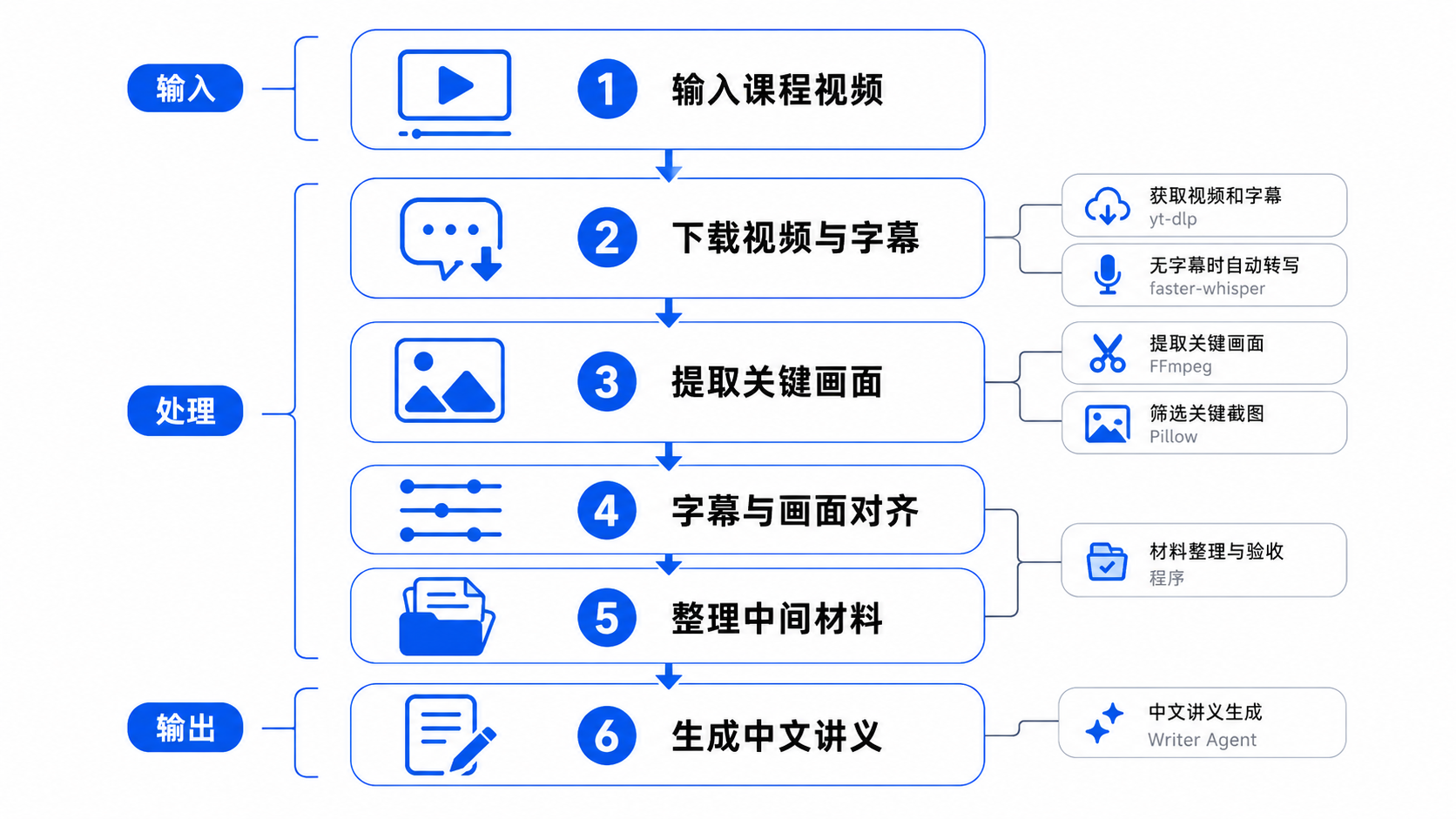
Diagram guide: input a lecture video → download video and subtitles (yt-dlp, with faster-whisper when subtitles are unavailable) → extract and select key frames (FFmpeg and Pillow) → align subtitles and images → organize and validate intermediate materials → generate a Chinese handout with the Writer Agent. The left-hand labels mark input, processing, and output.
Because the pipeline was fairly long, I didn’t dare give Codex a single sentence and let it improvise. If any step went off course, everything downstream would follow it.
So I treated Codex as an intern who could get a lot done but still needed supervision.
First, I asked ChatGPT to turn the task into a Plan Prompt, then gave that to Codex to produce an implementation plan.
When the plan came back, I read it myself, then asked ChatGPT to help spot anything missing.
Once there were no obvious problems, I’d generate an Execute Prompt and let Codex actually get to work.
Afterward, Codex also had to submit an execution report.
The process was more or less this.
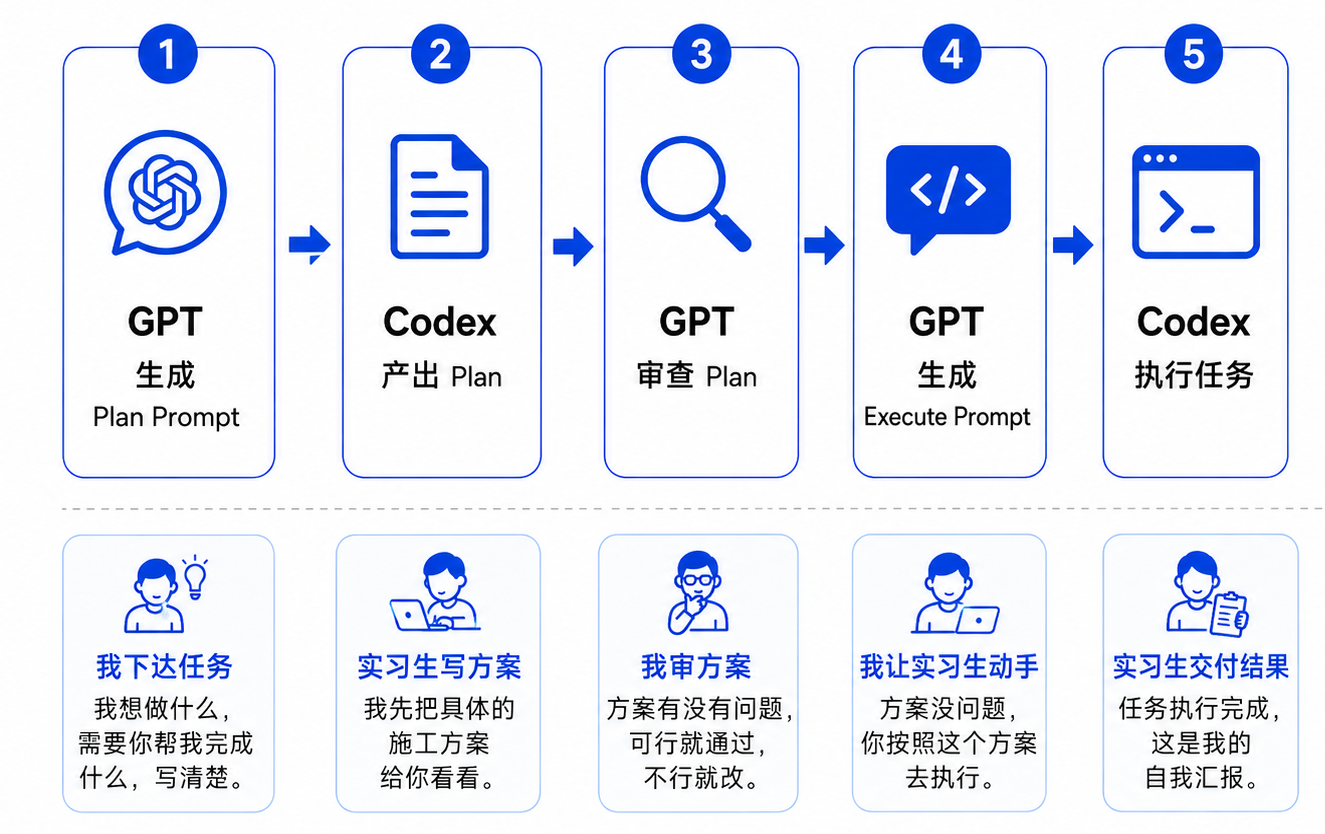
Diagram guide: GPT generates a Plan Prompt → Codex produces a plan → GPT reviews the plan → GPT generates an Execute Prompt → Codex executes the task. The intern analogy below follows the same sequence: I assign the task, the intern proposes a plan, I review it, I authorize the work, and the intern reports the result.
I also set up a minimal project skeleton by hand first, so it wouldn’t arrive in an empty directory and start improvising immediately.
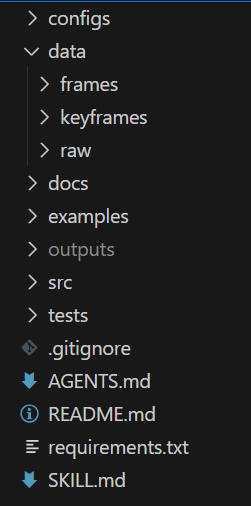
At the time, I thought I’d broken things down finely enough.
Then the very first round went wrong.
Let’s start with that first round: the subtitle problem from the beginning of this post.
After Codex finished, it reported that the task was complete. The video had been downloaded, and the subtitles had been retrieved.
Normally, I could have moved straight on. But something made me open the subtitle file for a quick look.
I just stared at it.
It hadn’t selected the clean subtitles that came with the video. It had picked the platform’s automatically generated captions instead.
Those automatic captions have a particularly annoying problem: rolling repetition. A sentence finishes, and the next caption repeats it along with the new words. The caption after that repeats it again.
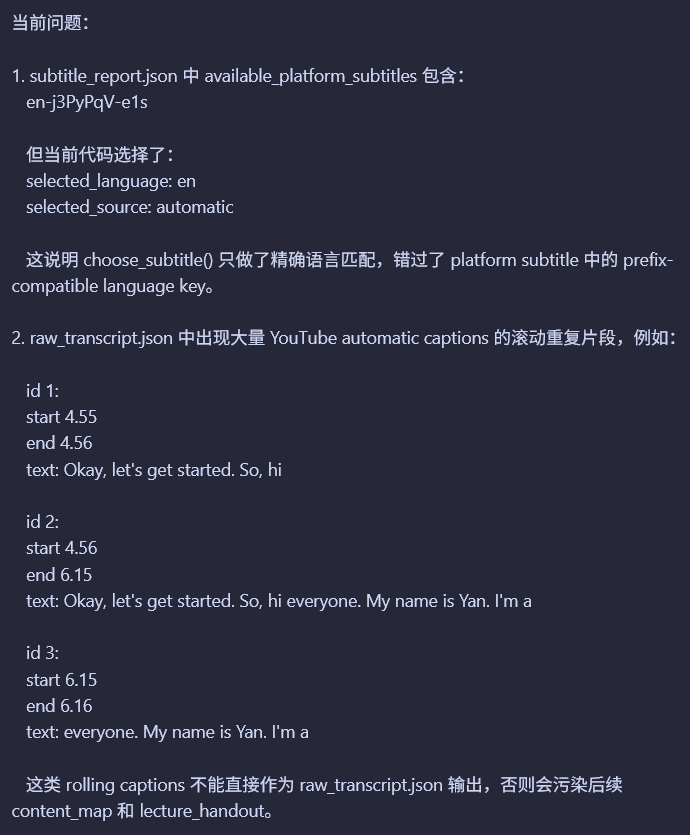
Screenshot guide: the report shows that a platform subtitle track was available, but the code selected selected_language: en and selected_source: automatic. Exact language matching missed a compatible prefixed track key. The sample transcript then shows overlapping, repeated caption fragments, which would contaminate the later content_map and lecture_handout.
If all I’d read was “subtitles retrieved” in the execution report, this problem would never have surfaced.
It might look like nothing more than choosing the wrong subtitle file, but the effect would spread through the pipeline. Content organization, image alignment, and handout generation would all be built on that dirty text.
That’s what makes this kind of problem so troublesome. It doesn’t blow up in front of you. It quietly slips into the final result.
From that round onward, I gave myself a rule.
I couldn’t just take the Agent’s word that it was done.
I had to check the work myself.
After fixing the subtitle problem, I added a fixed step to every round.
Acceptance checks.
Once the Agent finished a task, I wouldn’t move directly to the next round. I’d read its execution report first, then ask ChatGPT to help check for obvious gaps.
If the report looked fine, I’d open a separate, fresh Codex session and give it just one job: check whether the previous round had actually been completed.
This new Agent wasn’t there to continue development. Its only job was to verify the previous round’s work.
Mechanical checks—whether files existed, whether the directories were right, whether the formats were valid—could all go to that Agent.
But questions about content quality and practical value, such as whether a screenshot belonged in the handout or whether the subtitles were really clean, still needed my judgment.
Once both the Agent and I had checked the work, we’d write the lessons from that round back into the project documentation, so the next Agent would have something to remember and wouldn’t repeat the same mistakes.
The process looked roughly like this.
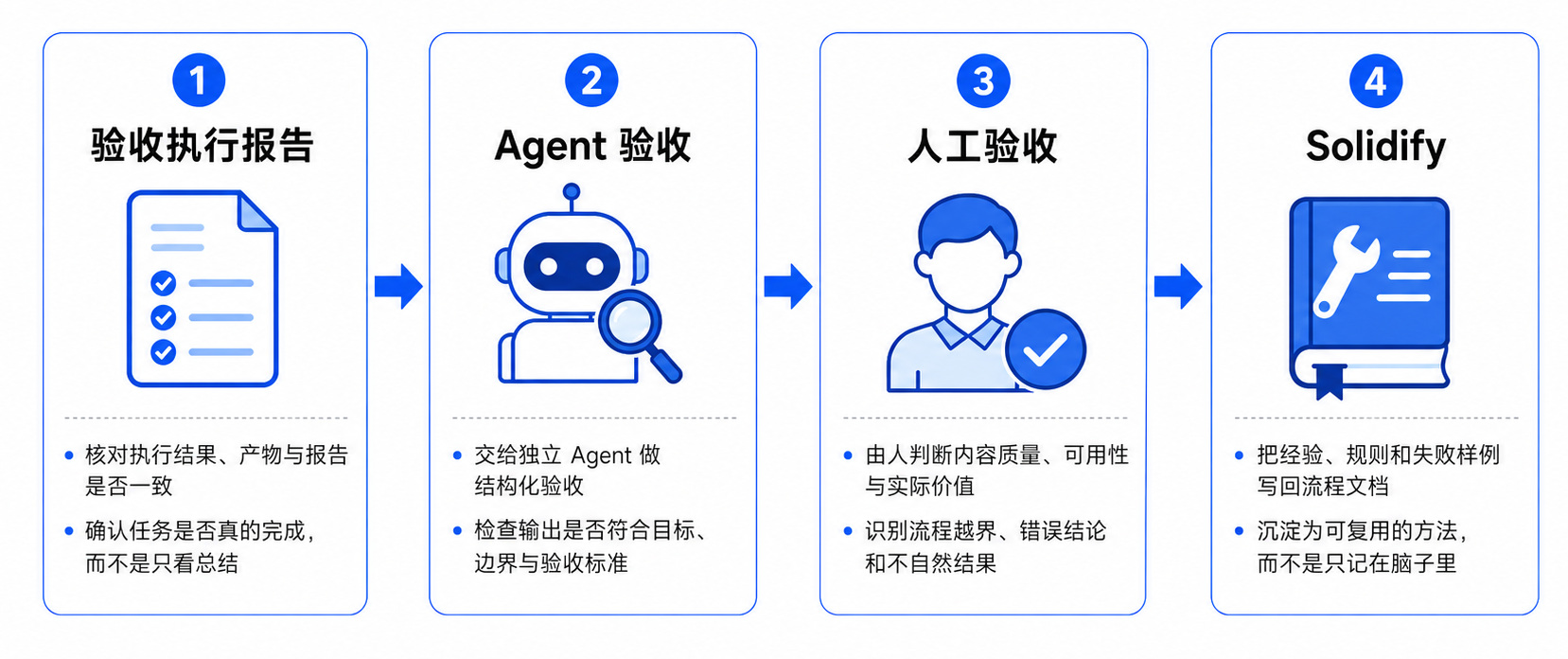
Diagram guide: check the execution report against the actual artifacts and confirm completion → give a separate Agent structured acceptance checks against the goals, scope, and criteria → have a person judge quality, usefulness, practical value, scope violations, incorrect conclusions, and unnatural results → “Solidify” the lessons, rules, and failure examples in reusable project documentation.
But once I started running it, I found another problem.
The acceptance Agent was a little too fond of calling me over.
One moment there was an error here; the next, a missing permission there. Every acceptance run still required me to sit nearby and deal with whatever came up.
That got annoying.
I’d added acceptance checks so I could spend less time hovering. Now I was still hovering, just in a different way. It felt a bit like I’d gone in a circle.
So I added another set of rules to AGENTS.md, specifically for Agent acceptance checks.
When a problem came up, keep going if you can. Don’t dump everything on me at once.
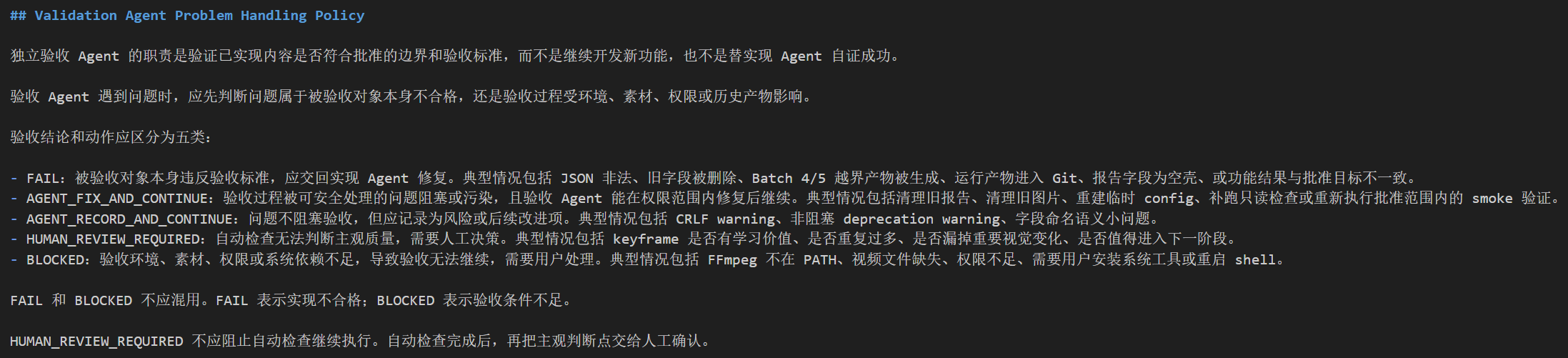
Screenshot guide: the acceptance Agent verifies approved scope and criteria; it does not continue feature development or prove its own implementation successful. The policy distinguishes FAIL, AGENT_FIX_AND_CONTINUE, AGENT_RECORD_AND_CONTINUE, HUMAN_REVIEW_REQUIRED, and BLOCKED. Human review waits until automatic checks finish; a faulty implementation and an unavailable acceptance environment are different outcomes.
During acceptance, I asked the Agent to look first at whether the artifact itself met the requirements.
If it didn’t, there wasn’t much to discuss: send it back for repair. I recorded these cases as FAIL.
If the artifact was fine, the next question was whether the problem blocked the current acceptance run.
If it did, and the Agent couldn’t handle it itself, then it should stop and call me in. Those cases were BLOCKED.
For problems that didn’t block the work, it should handle what it could on its own. If something was worth recording, write it down and keep going.
Questions I had to judge myself, such as screenshot quality, didn’t need to stop the run either. It could finish all the automated checks, then bring them to me together.
The routing rules looked roughly like this.
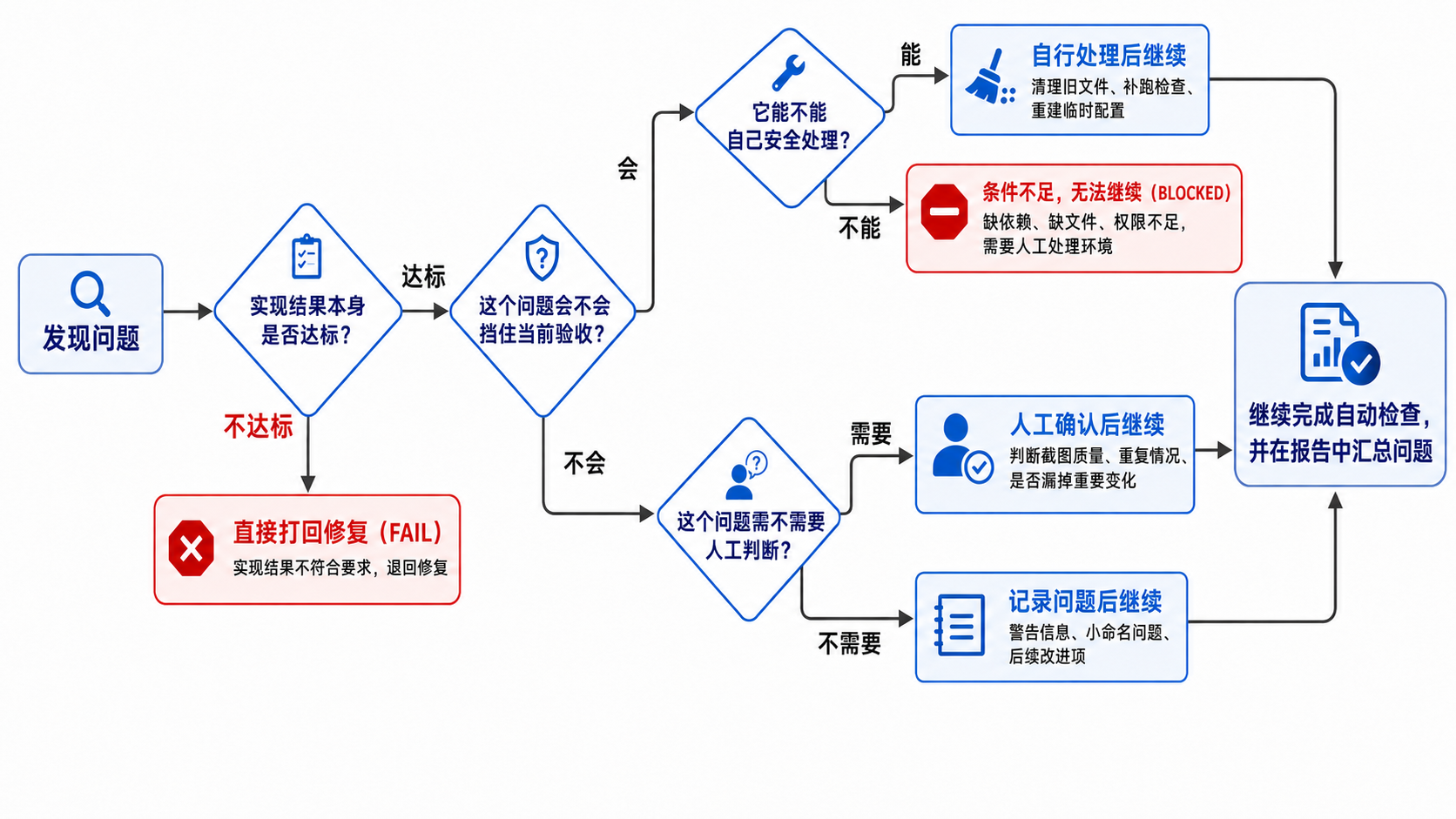
Diagram guide: does the implementation meet the requirements? If no, return it for repair (FAIL). If yes, does the problem block acceptance? A blocking problem is fixed safely by the Agent when possible; otherwise it is BLOCKED and needs human help with the environment. Nonblocking problems either need human judgment—image quality, duplication, or missing visual changes—or are recorded as warnings or later improvements. Continue automatic checks and summarize the issues in the report.
The later acceptance runs did become much smoother after I added these rules. But soon I hit a subtler problem.
At the key-frame extraction stage, the frame extraction process ran, the output directory was right, and the file formats were normal. As far as the program was concerned, everything was fine.
So the acceptance Agent didn’t flag an error. It only reminded me in the report that I should check screenshot quality manually.
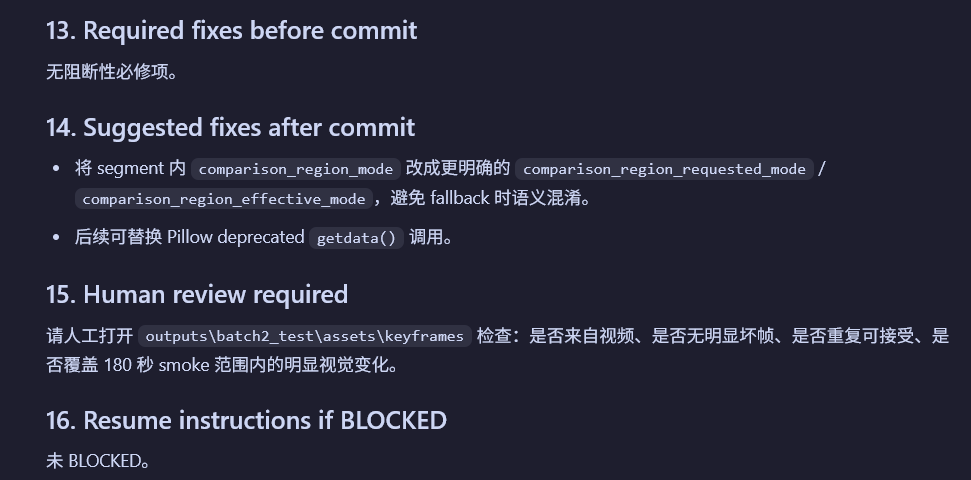
Screenshot guide: no blocking fixes were required. The report suggested later naming and deprecation cleanup, and asked me to inspect the key frames for source authenticity, broken frames, acceptable repetition, and coverage of visible changes within the 180-second smoke-test range. The run was not BLOCKED.
I went through the screenshots myself and did find a problem.
Some images looked different, but were actually successive reveal states of the same slide.
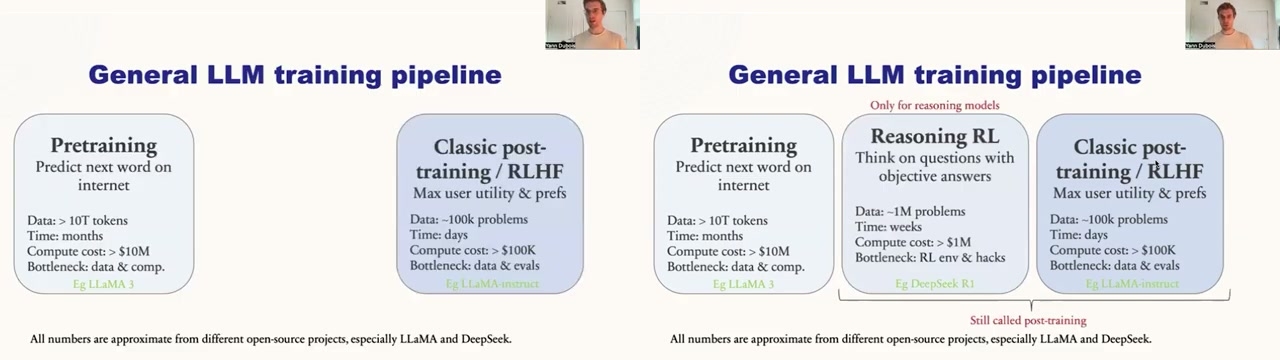
To a program, these two images can look very different. Quite a few elements really have been added.
To a person, though, it’s simply a slide that hasn’t finished revealing its contents yet. Putting that intermediate screenshot into the final handout would just leave the reader confused.
This is hard for a program to judge on its own.
It needs a person.
And that wasn’t even the worst of it. The acceptance Agent also pointed out something else in its report: the last key screenshot stopped at 4110s. The entire lecture was actually 7101s long.
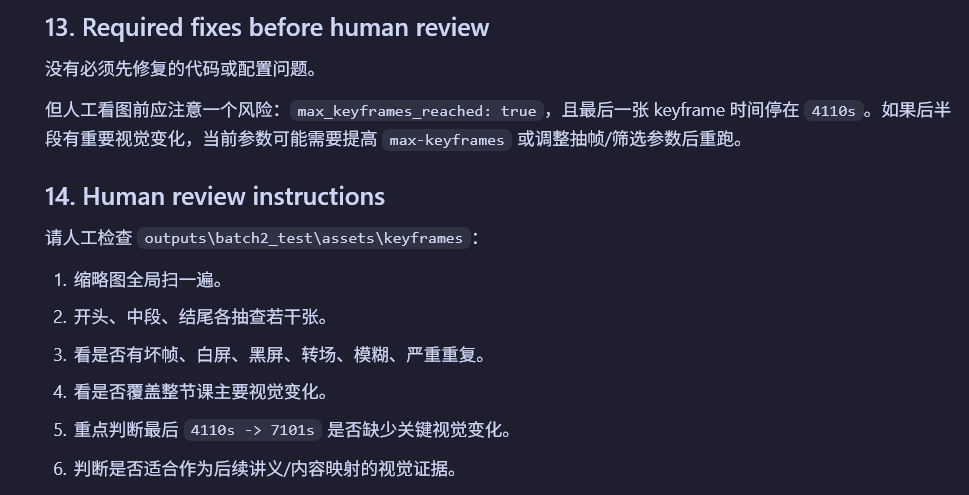
Screenshot guide: max_keyframes_reached: true, with the last key frame at 4110s. The report asks for a manual check of the entire image set and, especially, whether important visual changes are missing from 4110s → 7101s. It suggests raising max_keyframes or adjusting extraction and selection parameters if that later section contains important changes.
That was odd.
Following its suggestion, I went back to the original video and watched the 4110s → 7101s section. The lecturer was still teaching, and the slides were still changing.
So the program hadn’t just missed a few screenshots. It had quietly left out the entire latter part of the lecture.
I was pretty much numb at that point.
Without manual acceptance checks that round, I could have finished the whole project, picked up the handout, and only then discovered that half a lecture was missing. Debugging it afterward would probably have meant several times as much work.
Once I explicitly told the Agent this was a Bug, it found the cause quickly. The candidate-screenshot count limit was simply too low.
After that fix, the first lecture finally worked end to end. I tried a second lecture to see whether the pipeline was actually usable.
The handout hadn’t appeared yet, but the next Bug certainly had.
The project got stuck at video download. It never reached subtitle processing, image extraction, or handout generation.
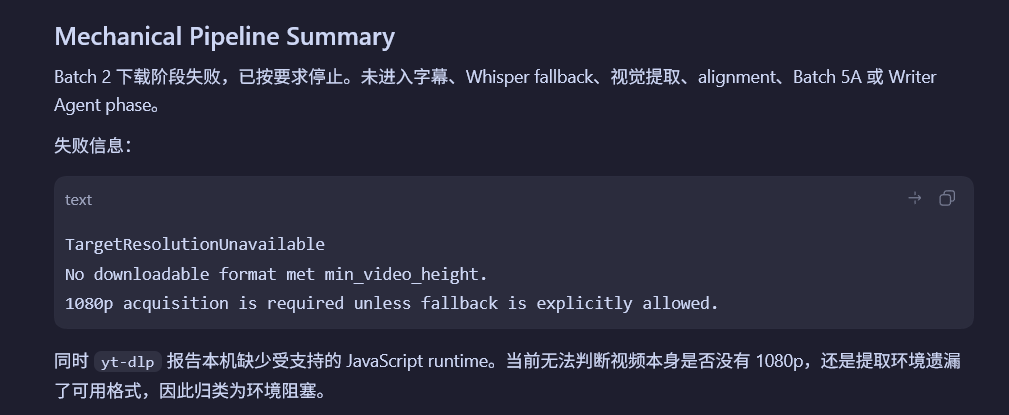
Screenshot guide: the pipeline stopped at download with TargetResolutionUnavailable; no format met min_video_height, and 1080p was required unless fallback was explicitly allowed. At that point, yt-dlp also reported a missing supported JavaScript runtime, so the report could not yet distinguish an unavailable 1080p source from formats missed by the extraction environment and classified the situation as an environmental blocker.
Eventually, I found that I’d made the video-resolution requirement too rigid: by default, it had to get 1080p. The first lecture happened to have 1080p, so everything worked. The second topped out at 720p, which stopped the entire pipeline.
As I write this, I’m getting a little PTSD.
Because it was exactly like my usual experience solving algorithm problems: the sample cases pass, and all the cases I made up pass too.
Then I submit.
Wrong Answer.
After finishing the project, I looked back over the whole thing.
The next time I ask an Agent to do some work, there are at least 4 more things I’ll check.
First, are the source materials actually right?
If it grabbed the wrong subtitles, nothing downstream can make up for it, however polished the result looks. Garbage in, garbage out.
Second, are the intermediate artifacts actually usable?
Don’t just read the Agent’s execution report. A directory exists, files were generated, and the program didn’t report an error: those things prove it ran. They don’t prove the result is useful.
Third, did the task actually run all the way through?
A few missing screenshots might be hard to notice. Half a missing lecture is a bit much.
Fourth, does it still work on another sample?
Success on the first lecture doesn’t mean success on the second. Passing the samples doesn’t mean you’ve earned an AC—an accepted solution.
After going through all of this, I increasingly feel that acceptance checks may take more skill than I’d imagined.
Agents are well suited to doing the work, and to mechanical checks too.
But what counts as finished, what counts as usable, and what deserves a place in the final result—those are still judgments for a person to make.
I used to think the most important parts were writing Prompts, building workflows, and getting the Agent to run automatically.
Now I tend to think that the person responsible for acceptance is what really sets the ceiling on the whole thing.
AI can help me get more work done.
But I need to know what it means for that work to be done well.
Finally, I put the whole process into one diagram.
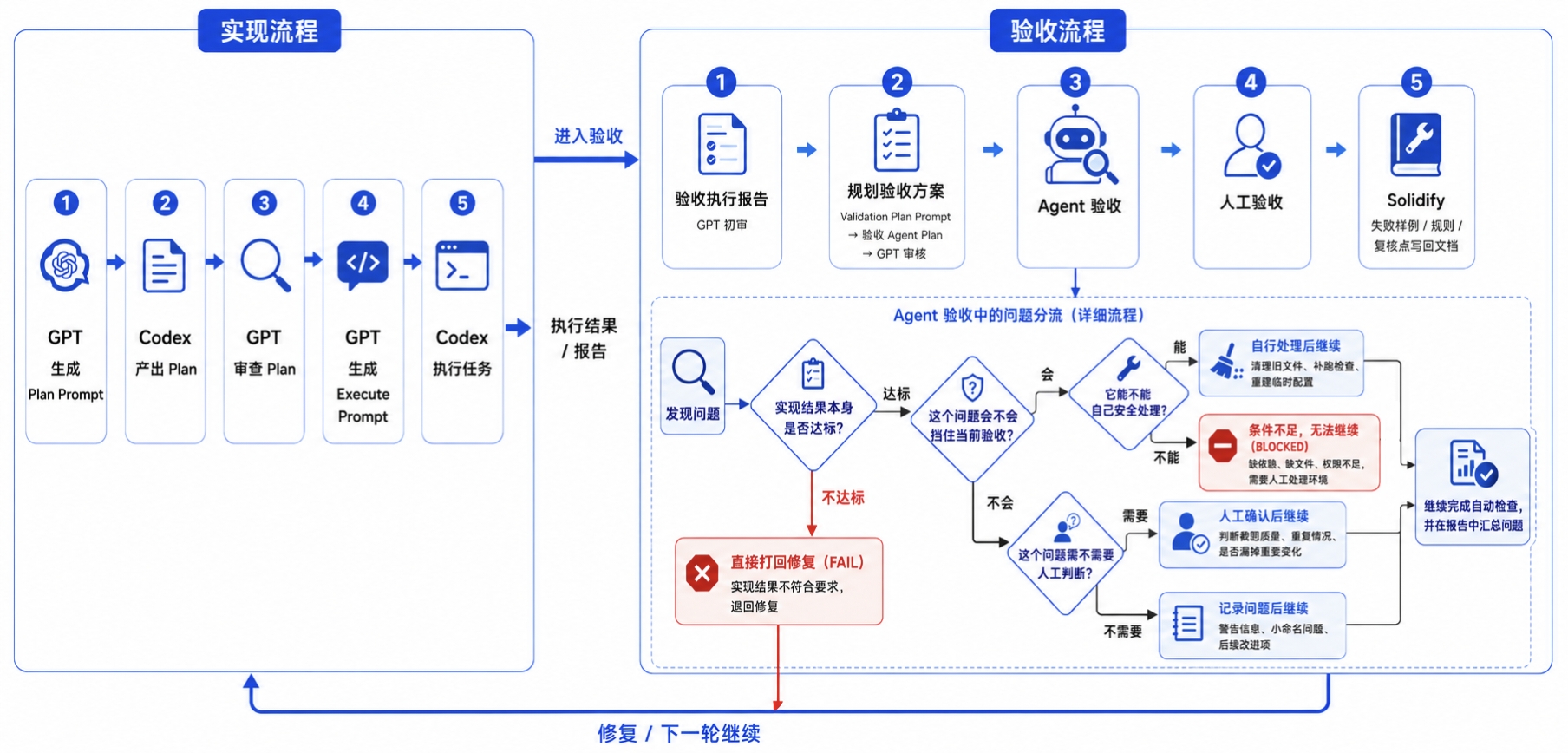
Diagram guide: the implementation sequence on the left is Plan Prompt → Codex plan → GPT review → Execute Prompt → Codex execution → results and report. Acceptance on the right adds an initial report review, a planned acceptance run (Validation Plan Prompt → acceptance Agent plan → GPT review), Agent checks, human review, and documentation of lessons. Within Agent checks, the problem-routing rules distinguish FAIL, safe fixes, BLOCKED, human judgment, and recorded nonblocking issues. The bottom arrow returns to implementation for fixes or the next round.
Here’s one of the final handouts as well.
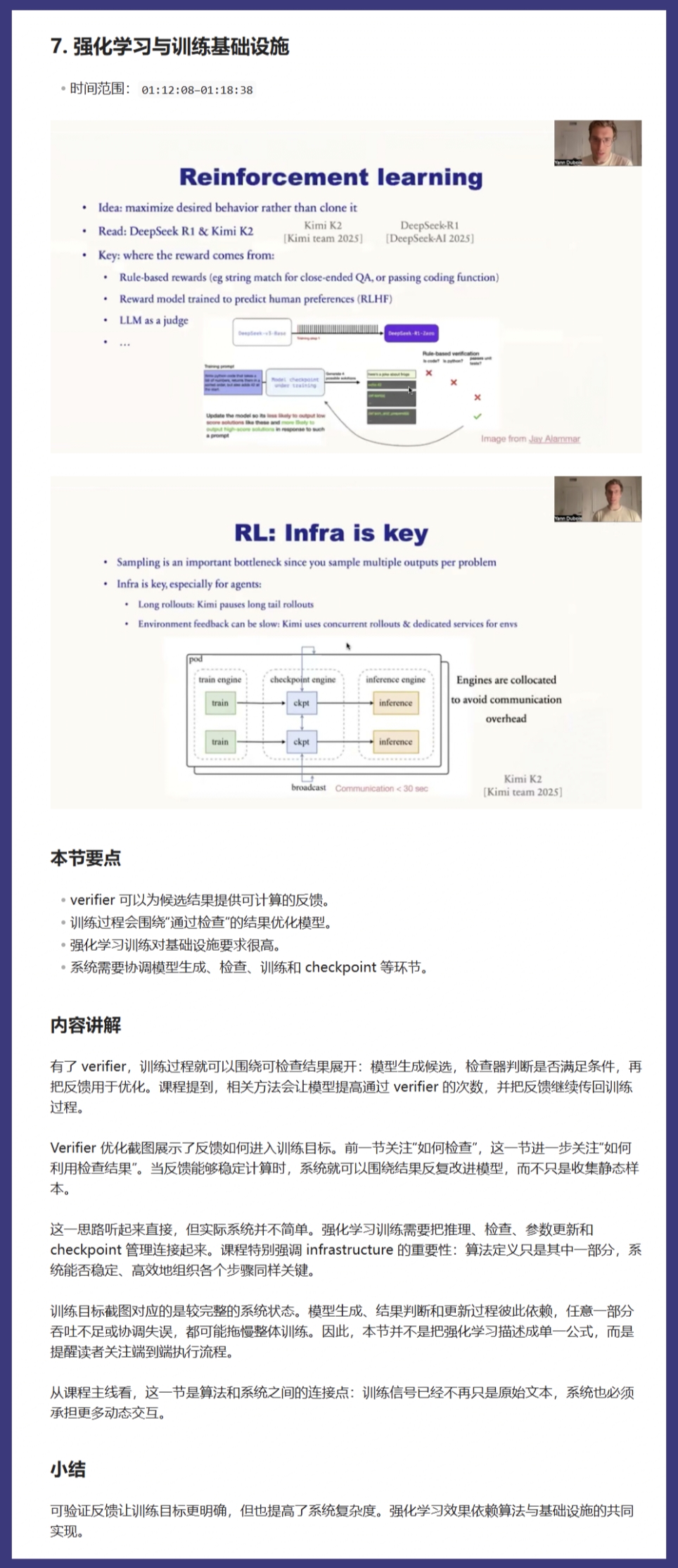
Screenshot guide: this handout section is “Reinforcement Learning and Training Infrastructure,” covering 01:12:08–01:18:38. It combines lecture slides with key points, a detailed explanation, and a short recap. Its main points are that verifiers provide computable feedback, training can optimize around checked outcomes, and reinforcement learning requires infrastructure that coordinates generation, checking, training, and checkpoints.
The project repository is here.
https://github.com/nine19een/video-to-handout
The examples, acceptance workflow, and screenshots in this post all come from this actual development process.
The most troublesome thing about an Agent has never been that it throws an error.
It’s that it doesn’t—and you believe it.