The whole thing began with something a little hard to pin down.
Lately, I kept coming across discussions about ChatGPT getting dumber. One explanation was that a node’s unclean IP could make GPT perform worse.
I already used ChatGPT and Codex every day—for coding, studying, and projects. I’d become pretty dependent on them. Seeing that claim, it was hard not to care at all.
As it happened, a couple of days earlier I’d also run the pelican riding a bicycle test in both the web version and Codex. The prompt was this:
Create an HTML page containing a 2D animation of a pelican riding a bicycle, drawn with SVG.
HTML describes a web page’s structure, while SVG can describe lines and shapes directly in code. I wanted to see whether the model could use code alone to draw a pelican riding a bicycle and then animate it.
These are the two results I saved. The first came from Codex, the second from the ChatGPT web version.

Codex GPT-6 Astra High

ChatGPT web version, GPT-6 Pro
My immediate impression was that the web version was more to my taste. The design, details, and overall finish of the page made the difference feel quite noticeable.
But the models, runtime environments, and ways of using tools weren’t identical, and I hadn’t repeated the test while changing only the IP. A difference in output doesn’t mean the IP caused it.
As for my existing proxy, I’d been using OuO: 130 yuan a year for 100 GB a month. Its everyday speed was fine, and the Japanese nodes had reasonably low latency.
Still, the exit was shared with other people. I looked through another round of node checks, and the more I looked, the less settled I felt.
So I thought: since AI was already a tool I used every day, why not give it a separate exit that was fixed, dedicated, and low-risk? I could pay a little more if it meant I could stop thinking about it.
I thought buying a new proxy would be the end of it.
Instead, I went from tinkering with the computer to tinkering with the phone, and ended up building a proxy chain.
Buying a dedicated IP should be simple enough, right?
At the start, I really didn’t have much systematic knowledge of proxies. Normally, I’d import a subscription, pick a node, and flip the switch. The smaller the number under the node, the happier I was.
But once I was actually ready to pay for a clean IP, I discovered that the terms on the product page meant quite different things.
Dedicated means whether the exit is shared with other proxy customers. Static means whether the address changes. Residential / ISP describes the network’s origin or ownership. Speed and stability are separate questions again.
ISP stands for Internet Service Provider. For a first approximation, a Dedicated ISP Proxy is a dedicated proxy using ISP-sourced addresses. Decodo’s explanation of static residential / ISP proxies also combines ISP sourcing with server hosting; it doesn’t mean a household has set aside its fiber modem just for me.
Once I broke it all down, I really wanted two things: a clean IP and a stable connection. More specifically, a fixed exit, preferably used only by me, that actually worked.
I eventually chose Decodo’s monthly dedicated plan with three IPs: two in Japan and one in the US. Japan would be my daily primary and backup; I’d keep the US one for situations that genuinely needed a US exit later.
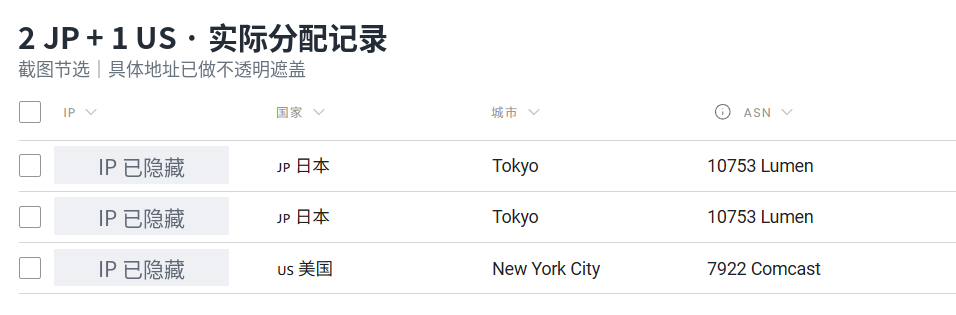
The allocation page when I bought the IPs.
Screenshot guide: two Japanese allocations in Tokyo and one US allocation in New York City. The columns are IP, country, city, and ASN; the actual IP addresses are hidden.
After receiving them, I checked each one on Scamalytics, AbuseIPDB, and IPinfo. IPQualityScore required registration, so I didn’t go any further with it.
At the time of the checks, all three IPs had Scamalytics risk scores of 0 and 0 reports on AbuseIPDB. The US IP appeared as a Comcast ISP network. Some databases classified the two Japanese exits as Hosting, meaning server-hosting networks.
At first, I was bothered that the Japanese exits were classified as server hosting. Then I thought about it: a pretty-looking check report wasn’t really what I wanted. If they were dedicated, fixed, and stable in actual use, there was no need to chase the labels too hard.
These were only third-party checks, after all. No abuse reports doesn’t mean an address has never been abused, and it doesn’t mean OpenAI will necessarily accept that exit.
After the purchase, the dashboard gave me three proxy entry points. The same domain, with different ports, corresponded to my three assigned exits. I confirmed them with actual requests and gave them these names:
| Name | Proxy entry point | Purpose |
|---|---|---|
| Decodo JP Main | isp.decodo.com:10003 |
Primary Japan exit |
| Decodo JP Backup | isp.decodo.com:10002 |
Backup Japan exit |
| Decodo US | isp.decodo.com:10001 |
Backup US exit |
The entry address and the final exit IP are different things. The client connects to Decodo’s entry point; the target website sees the address used when the request leaves Decodo.
At this point, I thought I was halfway done.
The difficult part was only just beginning.
The IP checks looked great. The websites I wanted wouldn’t open.
I first added the three nodes to FlClash as HTTP proxies.
The dashboard showed a Japanese exit, and sometimes the nodes even returned latency results. So I opened Google, YouTube, and ChatGPT.
Then the pages started spinning.
Google wouldn’t open. YouTube wouldn’t open. ChatGPT seemed to work at first, then stopped as well. I had to switch back to OuO to keep asking ChatGPT what was going on.
That was a little awkward.
I’d bought a new proxy to use AI more reliably. Now even troubleshooting the new proxy depended on the old one.
To avoid blaming everything on the client, I started testing with curl. Curl is a command-line network request tool: you can explicitly specify the proxy and target URL, then print the response or error.
In Windows PowerShell, I used curl.exe to specify the proxy and target explicitly. The command below replaces my real username with a placeholder. When only a username is supplied, curl prompts for the password, so it doesn’t need to go into command history.
1 | curl.exe -I --proxy "http://isp.decodo.com:10003" --proxy-user "YOUR_USERNAME" "https://www.google.com/" |
The result was still the same:
1 | curl: (56) Recv failure: Connection was reset |
Neither Japanese port worked, and switching to the US port gave the same result.
Yet Decodo’s own checking endpoint returned a response.
My first reaction was: does this product only support checking itself, rather than actually browsing the web?
Before I understood the proxy, PowerShell tripped me up twice
Once, I copied curl -U ... into PowerShell and got this instead:
1 | Invoke-WebRequest:无法处理参数,因为参数名称 U 具有二义性。 |
That error says Invoke-WebRequest couldn’t process the parameter because the name U was ambiguous. My environment treated curl as an alias for Invoke-WebRequest; it hadn’t called the real curl at all. I had to change it to curl.exe before I could continue.
Later, the AI gave me another command using ^ for line continuation. I pasted it in, and PowerShell complained again. That was CMD’s continuation syntax, not PowerShell’s.
At that point, I decided to keep subsequent short commands on one line wherever possible.
These errors had absolutely nothing to do with proxy quality. But they mixed into the troubleshooting and made everything look messier than it really was.
Support said it was supported, so I tested one variable at a time
I contacted Decodo’s live support.
An automated support agent answered first. It explicitly said Google and ChatGPT were supported and YouTube should work too, and asked me to try another ISP port.
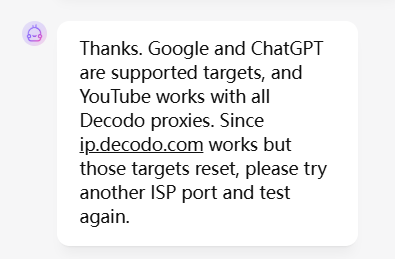
The support response I received at the time.
I tested all three ports again. Still resets.
Support then asked me to try a few unrelated HTTPS websites to see whether only those targets were affected. HTTPS adds TLS encryption to HTTP; TLS stands for Transport Layer Security and protects connection contents while verifying the server’s identity.
This time, there was a difference.
GitHub returned 301 or 200, Cloudflare returned 200, and ordinary HTTPS websites opened too.
A successful response looked roughly like this:
1 | HTTP/1.1 200 Connection established |
The proxy wasn’t completely unreachable. Different targets behaved differently.
I put the rounds of testing into a table:
| What I changed | What I saw at the time | What it could tell me |
|---|---|---|
| Switched among all three ports, covering Japan and US exits | Google, ChatGPT, and similar targets still reset | It didn’t look like an intermittent fault on just one exit |
| Tested GitHub, Cloudflare, and other sites instead | Normal HTTP responses came back | Not every HTTPS connection failed |
| Switched from the desktop to the laptop | The problem still reproduced | It wasn’t limited to the original computer |
| Connected the laptop to Wi-Fi and then a phone hotspot | Google and ChatGPT still failed; GitHub was reachable | It wasn’t limited to one LAN, but a shared upstream network environment hadn’t been ruled out |
After changing devices and trying the hotspot, the AI and I briefly turned our attention to the provider’s account or gateway.
But these tests still couldn’t fully rule out network factors. Changing the access network doesn’t mean changing every shared part of the network path. The devices and phone hotspot could still traverse similar upstream networks. That narrowed the search; it didn’t establish that Decodo was responsible.
Along the way, support also asked me to check background VPNs, firewalls, and antivirus software. I explained the tests I’d already done again and was eventually transferred to a human. The human support agent couldn’t reproduce the error with the same request on their side, so they asked me to try cellular data. The laptop/hotspot comparison in the table came from that part of the investigation.
There was another small trap: once, I used -I with ip.decodo.com/json and got 405 Method Not Allowed. This time, the network hadn’t broken. The endpoint accepted only GET / OPTIONS, while I’d sent a HEAD request to retrieve headers only. Removing -I restored the original GET check.
An HTTP error response and a dropped connection need to be judged separately.
curl -v finally showed me where the connection stopped
The human support agent asked for a verbose log, meaning a more detailed connection trace printed with -v.
This was the test command. The account name and authentication information in the logs have been replaced with placeholders.
1 | curl.exe -v -o NUL --proxy "http://isp.decodo.com:10003" --proxy-user "YOUR_USERNAME" "https://chatgpt.com/" |
-o NUL discards the response body so the terminal isn’t flooded with an entire web page. The connection trace still appears.
The important part of the failed record was:
1 | > CONNECT chatgpt.com:443 HTTP/1.1 |
Some later tests instead showed:
1 | curl: (56) Proxy CONNECT aborted |
Only then did I begin to understand that accessing an HTTPS website through an HTTP proxy isn’t simply a matter of throwing the web request at it.
First, the client tells the proxy: please establish a tunnel to chatgpt.com:443. That is CONNECT. After receiving a successful response, the client performs a TLS handshake with the target website inside that tunnel, then sends the encrypted web request.
So 200 Connection established followed by 200 OK isn’t the same success message repeated twice. The first means the proxy tunnel was established. The second is the target website’s HTTP response.
My failed trace hadn’t even received the first one.
That showed the connection was interrupted during CONNECT, before the TLS handshake with the target website. Whether the request was interfered with along the way or something went wrong in proxy-side processing, the client log didn’t say. Locating the stage of interruption doesn’t identify the party responsible.
Likewise, Proxy auth using Basic only says the client was preparing to send that form of authentication. It doesn’t mean the server had confirmed authentication was successful.
An email from the technical team sent me in another direction
Support passed the ticket to the technical team. Initially, they said a reply would usually come within two business days, but I received an email later that same day.
They noticed the same contrast: their checking endpoint was reachable, while Google and ChatGPT were reset. They thought it looked like network-level filtering or interference, asked where I was located, and suggested comparing protocols and results with the VPN both on and off.
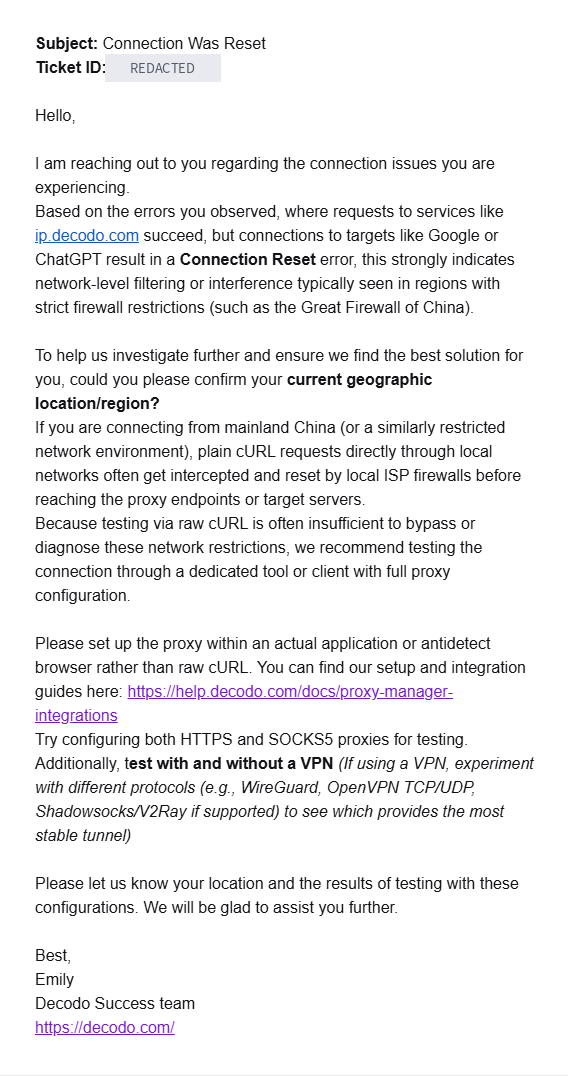
The technical team’s reply.
So I switched OuO back on and enabled the client’s TUN mode, which uses a virtual network interface.
I learned another lesson here: TUN isn’t an overseas node or an encryption protocol. Its job is to hand system network packets to the proxy program. Whether they are encrypted afterward and which exit they take depends on the client and the actual node protocol.
With only the system proxy enabled, applications have to use those settings to send requests into it. Since I’d explicitly specified Decodo in curl, I couldn’t expect it to automatically add OuO as another layer. I used TUN for this comparison so that the connection to Decodo’s entry point would also enter the existing proxy path.
This time, Google worked, and YouTube was accessible too.
But ChatGPT still returned:
1 | Proxy CONNECT aborted |
I also tested openai.com and api.openai.com. The same error.
It was starting to look as though OpenAI was restricted separately. Yet support had explicitly said it was supported.
There was still one variable from the email I hadn’t finished trying.
SOCKS5.
I switched to SOCKS5, and hundreds of KB of web page suddenly filled the terminal
SOCKS5 is another proxy protocol. Instead of negotiating through HTTP’s CONNECT method, it has its own authentication and connection-request formats, allowing the proxy to connect to a specified domain and port.
I switched to this command:
1 | curl.exe -v -o NUL --proxy "socks5h://isp.decodo.com:10003" --proxy-user "YOUR_USERNAME" "https://chatgpt.com/" |
The h in socks5h matters: it tells the proxy to resolve the target domain, rather than having the local machine resolve it to an IP first.
On the very first attempt, I hadn’t added -o NUL yet. As soon as I pressed Enter, a huge amount of text streamed through the terminal—far more than I could copy.
I was still asking how I was supposed to capture all of that.
Then I realized it wasn’t a long stream of errors.
It was the body of ChatGPT’s web page.
After adding -o NUL, the key result was easy to see:
1 | * SOCKS5 connect to chatgpt.com:443 (remotely resolved) |
Then I turned off both OuO’s system proxy and TUN and connected directly from my current network to Decodo SOCKS5.
Still 200 OK. This attempt downloaded about 486 KB of page content.
After all that tinkering, I finally had something that worked.
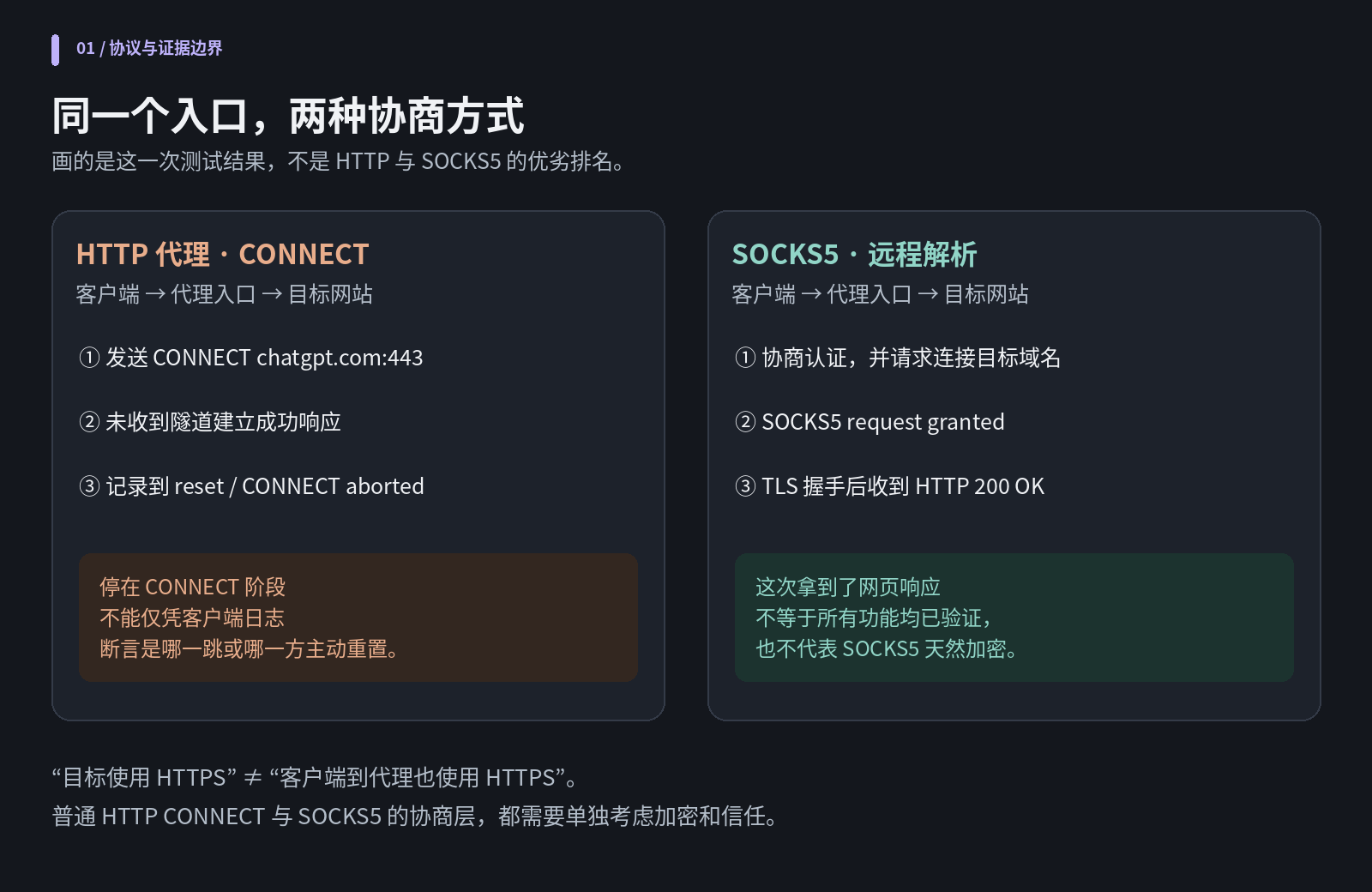
The HTTP CONNECT and SOCKS5 test results.
Diagram guide: the same entry point, two negotiation methods. HTTP sent CONNECT but received no tunnel-success response, recording a reset / CONNECT abort before TLS to the target. SOCKS5 negotiated authentication and the target domain, received SOCKS5 request granted, then reached HTTP 200 OK after TLS. This describes this test, not a general protocol ranking or a verified cause; SOCKS5 is not inherently encrypted, and one page response does not verify every feature.
HTTP proxies, HTTPS proxies, and SOCKS5: what’s the difference?
Changing protocols solved this connectivity problem, but the distinction between them isn’t a question of one being more advanced.
When accessing an HTTPS site through a plain HTTP proxy, TLS can still encrypt the target content, but that doesn’t automatically encrypt the initial CONNECT negotiation itself. With a true HTTPS proxy, the client first establishes TLS to the proxy as well. A proxy doesn’t become an HTTPS proxy merely because the target URL starts with https://.
And SOCKS5 isn’t inherently an encrypted tunnel either. In particular, the standard explicitly states that the password in the common username/password authentication method is carried in plaintext. The target website’s HTTPS protects web content; it doesn’t reach backward and encrypt the SOCKS5 authentication stage.
What this test confirmed was that, with the same set of entry points, HTTP CONNECT failed to access OpenAI while the SOCKS5 path worked. Whether the difference came from protocol characteristics, gateway implementation, or intermediate network equipment remained unresolved.
Being able to connect and being able to get work done are different things
I thought changing every type: http to type: socks5 in FlClash would finish the job.
Instead, the nodes alternated between green and timeout. The websites weren’t completely inaccessible: they opened, but slowly, with resources loading endlessly and spinners wearing out my patience.
That was even more annoying than a page that wouldn’t open at all, because you always felt it might work if you waited just a little longer.
A successful curl request proves that that particular request received a response. A browser still needs to load scripts, images, and API requests. Some ChatGPT and Codex features also use WebSockets—connections supporting ongoing two-way communication.
Downloading the homepage HTML was still some distance from a useful setup.
I made another comparison. In both cases, I requested the ChatGPT homepage through Decodo SOCKS5. In one, OuO TUN took over the connection first; in the other, I connected directly to Decodo.
These are the raw numbers I saved:
| Metric | OuO TUN → Decodo | Direct to Decodo |
|---|---|---|
time_connect |
0.009220 s | 1.219353 s |
time_starttransfer |
1.960126 s | 3.500436 s |
time_total |
2.706354 s | 4.599579 s |
speed_download |
183747 B/s | 126562 B/s |
Time to first byte measures from the start of the request until the first byte arrives, including connection setup and server processing. Total time is the duration of the whole operation. The rate here is also the average transfer rate of this response, not a separate measurement of line bandwidth.
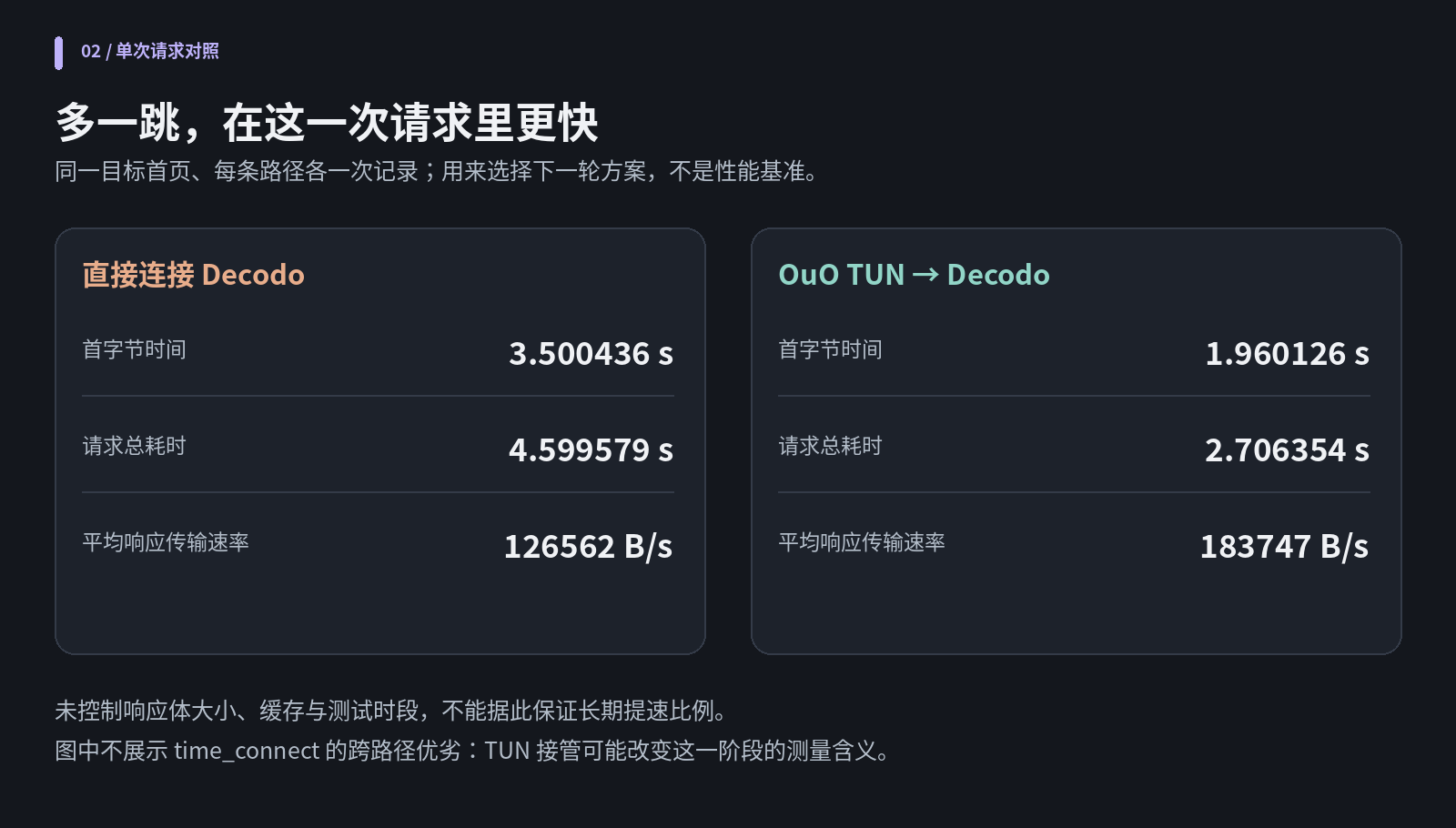
One request over each path: direct access and access through OuO.
Chart guide: left is direct to Decodo, right is OuO TUN → Decodo. Rows show time to first byte, total request time, and average response transfer rate. This extra-hop path was faster on this request. Body size, cache state, and test timing were not controlled, so the figure is not a performance benchmark or a long-term speed guarantee. It omits a cross-path time_connect comparison because TUN can change what that measurement means.
Each path was recorded only once. Response-body sizes and caching weren’t controlled, so these numbers can’t be used directly to calculate a long-term percentage speedup.
In particular, time_connect of just 9 milliseconds on the TUN side doesn’t mean the actual latency to the overseas proxy was only 9 milliseconds. Once a virtual network takes over, the connection setup curl sees does not necessarily mean the entire cross-border path behind it is ready.
Those numbers made me more willing to try chaining. What ultimately convinced me to keep it, though, was the later experience of actually using the browser and Codex.
I also stopped planning to replace the old proxy directly with the new one.
Instead: let the old proxy provide a smoother route, and let the new proxy determine the final exit IP.
In the end, I chained the old and new proxies together
I had also worried about a very practical issue: I often watch courses on YouTube while asking AI questions. Would I now have to use OuO for video, then switch to Decodo to ask a question?
I’d spend all my study time switching nodes.
A proxy client can route by domain, so there is no need to keep switching. Different connections in the same browser on the same device don’t have to use the same exit.
I eventually split the traffic into three paths:
1 | ChatGPT / OpenAI |
Route guide: ChatGPT / OpenAI uses device → OuO Japan node → Decodo SOCKS5 → OpenAI. Ordinary overseas access, including Google / YouTube / Gmail, uses device → OuO Hong Kong node → target service. Domestic Chinese and local services matching existing direct rules connect directly.
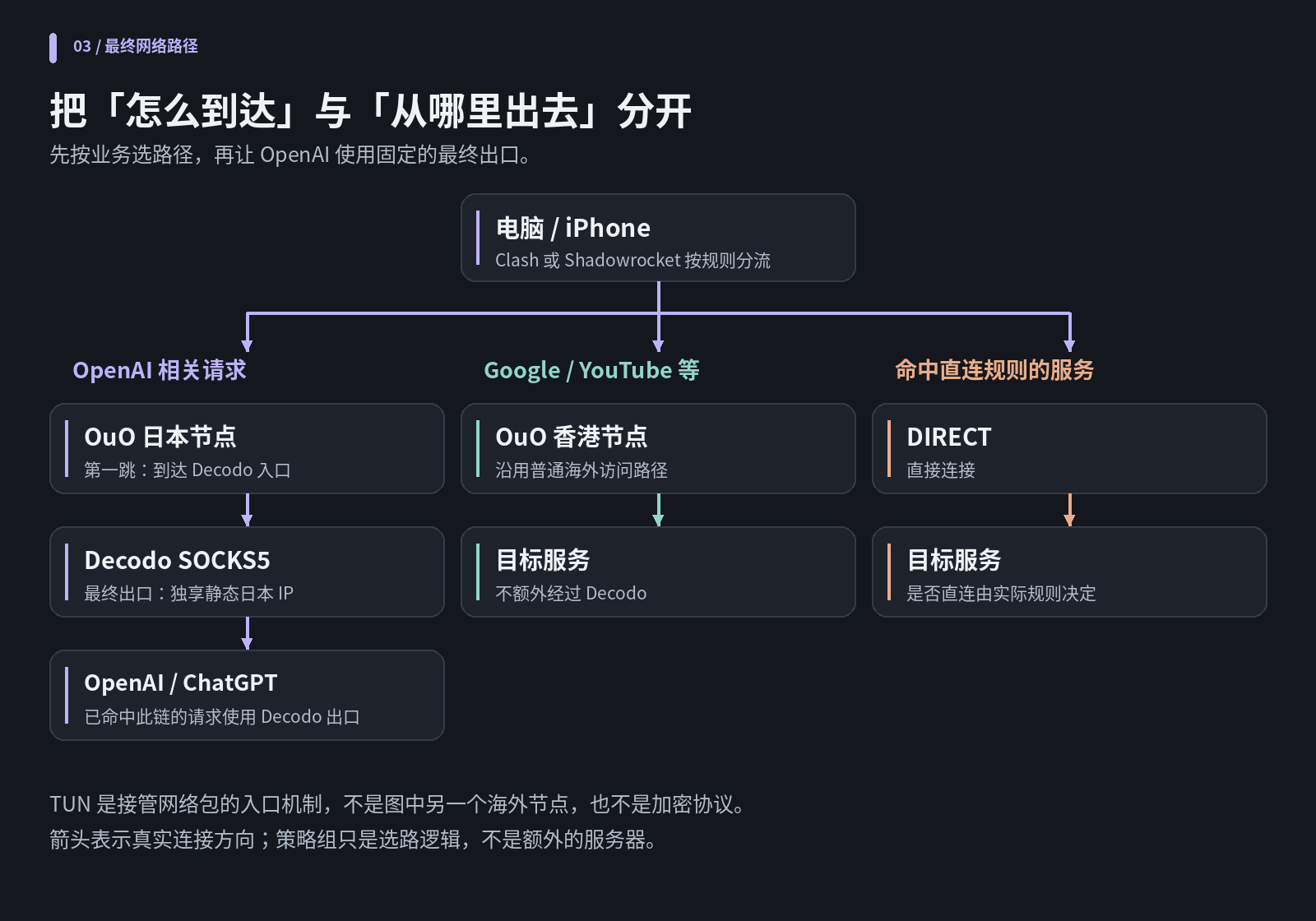
The final traffic routing and proxy chain.
Diagram guide: separate “how to reach it” from “which IP to exit through.” Clash or Shadowrocket applies rules on the computer / iPhone. Purple is OpenAI traffic via OuO Japan, then the fixed dedicated Japanese Decodo exit; green is Google / YouTube and similar traffic via OuO Hong Kong; orange is traffic matching DIRECT rules. Arrows show actual connection direction. Policy groups are routing logic, not extra servers; TUN is packet interception, not an additional node or encryption protocol.
In this chain, OuO’s Japan node was the first hop, and Decodo was the exit that sent the final request outward. For connections that actually matched this chain, the target service saw Decodo’s exit, rather than OuO’s shared exit.
Proxy chaining separates routing and exit responsibilities; it isn’t a guarantee of anonymity. OuO and Decodo still each participate in the connection. SOCKS5 authentication and target information also don’t automatically become confidential from every participant along the entire chain.
Windows: a nineteen-thousand-line configuration, with only a few key changes
My OuO configuration had more than nineteen thousand lines.
Looking at it, I wasn’t very keen to edit it by hand. I eventually gave the file to AI to help inspect and modify.
Fortunately, the existing configuration already had policy groups such as OpenAI, Google, and YouTube. A policy group lets a category of requests select a node—or select another group.
There was no need to rewrite all the later rules. The key was to add dialer-proxy to the Decodo nodes, referring to the existing Japan node group so Decodo would establish its connections through that group.
Within the existing YAML configuration’s proxies list, these were the key fields for a Decodo node:
1 | proxies: |
Then I pointed the OpenAI policy group at the Decodo selection group and selected Decodo JP Main. The first-hop Japan group contained only the original OuO nodes. I didn’t put Decodo back into it, which would risk a loop.
This chaining configuration is separate from TUN. Earlier, TUN was part of the experiment to intercept curl’s connection. Once the configurations were formally merged, dialer-proxy explicitly specified the first hop. With only system proxy enabled and TUN off, my computer could still put requests entering the client through this chain. That did not take over every program’s traffic.
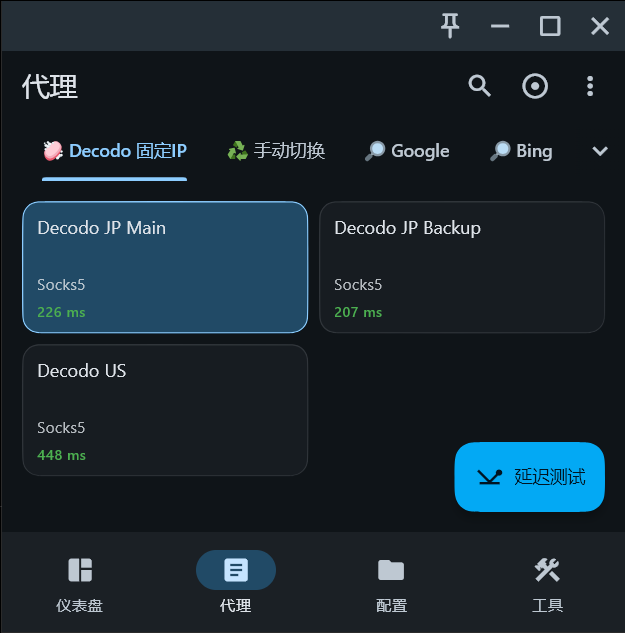
The three Decodo nodes in FlClash.
Screenshot guide: the selected group is “Decodo fixed IP,” with Decodo JP Main selected. The neighboring tab labeled “manual switch” is another policy group; the button runs latency tests.
Once the websites worked again, I checked the actual exit once more.
I temporarily assigned ip.decodo.com to the OpenAI policy group too, then queried the final exit and confirmed that it really was the primary Japanese IP. Without that rule, an ordinary IP-check page would use the default overseas exit, so seeing an OuO address there was normal.
Then I sent a small task in Codex that actually called the model and went back to the client’s connections page.
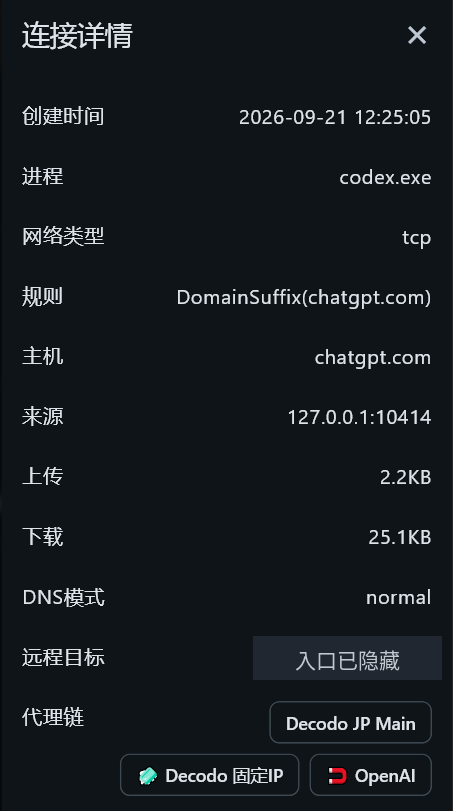
Codex matched Decodo JP Main.
Screenshot guide: the connection-details labels are creation time, process, network type, rule, host, source, upload, download, DNS mode, remote target, and proxy chain. The process is codex.exe, the host is chatgpt.com, and the chain includes Decodo JP Main; the entry address is hidden.
The process shown was codex.exe, the target was chatgpt.com, and the policy chain included Decodo JP Main. This model request really had reached the node I’d specified.
The second computer taught me another lesson: a policy group isn’t a global master switch
I have two desktops and a laptop, and the clients aren’t all the same: some use FlClash, others Clash Verge.
After the first machine worked, I copied the configuration over. ChatGPT worked and YouTube played, but Gmail stayed on its loading screen.
I thought the route had broken again on the new computer.
It turned out that this machine’s Google group was still set to manual switching, which pointed to another OuO route. Once I changed it to a working Japanese node, Gmail recovered. Later, based on actual use, I chose a low-latency Hong Kong node for ordinary overseas traffic.
I’d assumed that once I’d selected Decodo JP Main, I no longer needed to worry about the other groups below it.
In rule mode, though, group choices can be active at the same time. Google follows the Google group, YouTube follows the YouTube group, and OpenAI follows the OpenAI group. One group can also refer to another, so they aren’t entirely independent either.
Copying the YAML doesn’t mean every client has exactly the same saved selection state.
Once I understood that, moving the setup to the remaining computers went smoothly.
I kept a local copy of the configuration in the end, so subscription updates wouldn’t overwrite my manual changes. But that copy won’t automatically track OuO updates either. If the subscription’s nodes change later, I’ll need to sync them and check the references.
The final hurdle: moving the same logic to the iPhone
My phone uses Shadowrocket, so I couldn’t expect to copy Mihomo’s fields over directly.
But in the node details I found an option that was very easy to understand: Proxy Through.
I filled in the SOCKS5 parameters for Decodo JP Main and set Proxy Through to OuO’s AnyTLS.JP 03. That gave me the corresponding network path.
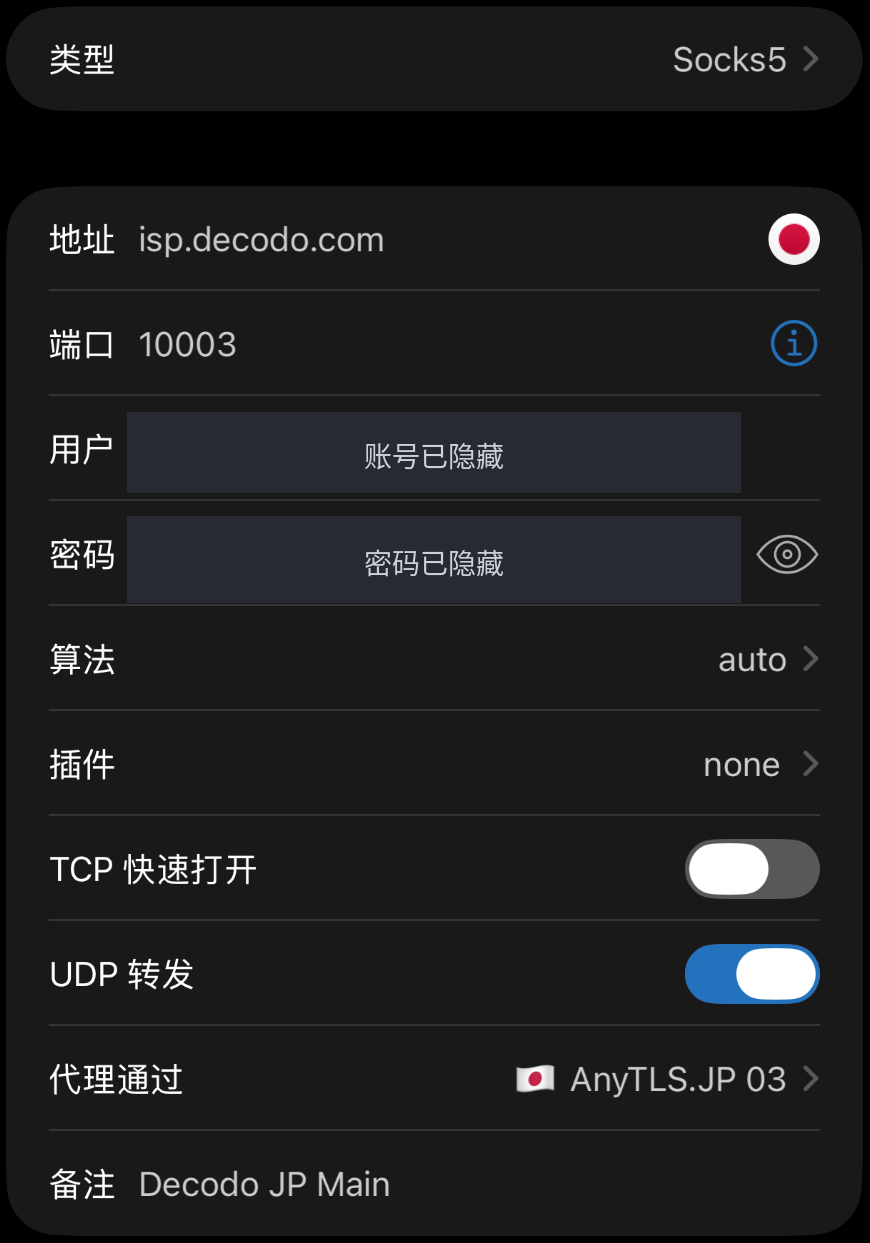
Shadowrocket’s Proxy Through setting.
Screenshot guide: the fields are type, address, port, user, password, algorithm, plugin, TCP Fast Open, UDP relay, Proxy Through, and remarks. The node uses SOCKS5 at isp.decodo.com:10003 and passes through AnyTLS.JP 03; account and password are hidden.
I first temporarily sent the phone through Decodo, opened the checking page in Safari, and got the same exit as on the computer. The ChatGPT web version opened too.
But I wasn’t sure whether the app was using it as well.
So I went back to the logs.
In the earlier round, before fine-grained routing, ios.chat.openai.com and chatgpt.com used PROXY, Google used PROXY too, and the currently selected node on the home screen was Decodo.
That meant Google also went through Decodo. Routing wasn’t finished yet.
I put the OpenAI-related rules at the beginning of the current configuration, explicitly pointing them to Decodo JP Main. Then I changed the home screen’s default node back to OuO Hong Kong and kept Global Routing in Configuration mode.
These were the four core rules. My actual configuration also added DOMAIN-KEYWORD,openai, pointing to Decodo as well, to match connections whose domain contains openai.
1 | DOMAIN-SUFFIX,chatgpt.com,Decodo JP Main |
Suffix matching covers the corresponding subdomains, so I didn’t need separate rules for ios.chat.openai.com, ws.chatgpt.com, and ab.chatgpt.com.
After the changes, the key log entries looked like this:
1 | # ChatGPT App |
Log guide: the Chinese comments identify other ChatGPT connections, the user-content domain, and a domestic Chinese website, respectively. The original log text is retained.
The same batch of records also showed Decodo’s backend chain, the OuO Japan session, and the SOCKS5 handshake ok.
The app’s main connections went through Decodo; Google and YouTube went through Hong Kong; domestic websites stayed direct. Routing matched what I’d intended. Along with actually sending messages and loading content, that established that everyday phone use worked too. I haven’t fully tested voice and video features.
Only at this point did the three computers and iPhone finally share the same main routing logic.
After all that, what had I actually solved?
At the start, my thinking was: I wanted a clean IP, preferably one that would stop me worrying about GPT getting dumber.
What I actually solved was more specific: my main OpenAI requests now had a path with a fixed exit, inspectable routing, and smooth performance in actual use.
Exit reputation, access protocol, connection quality, and routing rules need separate checks. A low risk score doesn’t guarantee a target will be accessible. A 200 from curl doesn’t guarantee a smooth browser experience either. Only when actual requests, client logs, and everyday use lined up did I consider the configuration working.
AI saved me a lot of trouble by explaining concepts, organizing commands, and editing a configuration with more than ten thousand lines. But it also gave PowerShell a CMD command and guessed at causes too early from incomplete symptoms. The configuration I kept was the result of repeated real tests.
To finish up, I used find and replace to update the passwords on the three Decodo nodes, then synced them to the other devices. The Proxy-Authorization: Basic ... entries in troubleshooting logs also needed redacting: Base64 is encoding, not a way to keep a secret.
As for the original question: did giving GPT a clean IP actually make it smarter?
I didn’t run a before-and-after comparison of model capability, so this experience can’t answer that.
What I can confirm is that ChatGPT is stable in use and Codex’s model connection shows the right policy chain, while YouTube and Gmail can keep using the original, faster routes.
Maybe my account had never been “dumbed down” in the first place.